MyCHRISTUS
- 4.0
- Rating
- 50.00K
- Installs
- Free
- Price

 Analysis by App-foxy
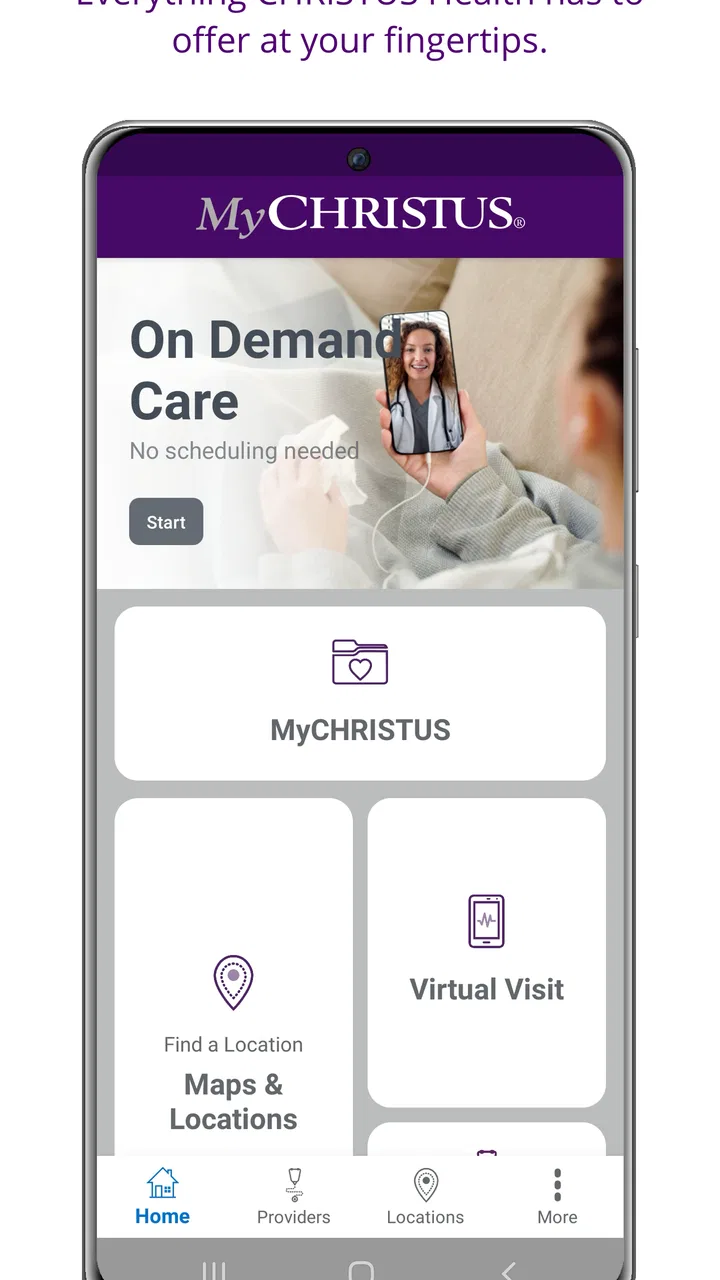
Managing healthcare is rarely difficult because people do not care about their health. It is difficult because appointments, messages, records, and provider details are often scattered across different places. MyCHRISTUS, the medical app from CHRISTUS Health, is designed to bring that relationship into one mobile starting point. After spending time with it, I see its main value less as a replacement for every healthcare interaction and more as a way to reduce the small bits of friction that make routine care harder to organize.
The app is free, aimed at everyone, and sits in the medical category. Its store summary describes convenient access to CHRISTUS Health, while the short description simply identifies it as MyCHRISTUS. That modest presentation is useful because it sets the right expectation: this is a patient-access tool, not a diagnostic app, emergency service, or general health encyclopedia.
What makes it worth considering is the connection between a patient and the CHRISTUS Health system. Instead of treating healthcare as a collection of phone calls and paper reminders, the app gives users a digital place to begin. The real benefit is continuity: routine healthcare tasks become easier to revisit when they are kept in the same account and app.
You May Also Like

 Blood Strike: 2.5 Anniversary
Blood Strike’s Loadouts Turn Every Drop Into a Tactical Gamble
A close look at Blood Strike’s custom loadouts: how fast access to signature weapons reshapes its battle royale rhythm, rewards preparation, and narrows the gap between fights.

 Pandora - Music & Podcasts
Pandora’s Music Is Easy to Start, but Harder to Recover
Pandora’s strength is its low-effort path from a seed to a station. Its weak spot is how much confidence it asks you to place in connection, setup, and quiet recovery.

 8 Ball Pool
 Is Built on Rivalries, Rematches, and Routine
A close look at the rivalries, rematches, shared routines, and unanswered safety questions that turn a quick pool match into a persistent mobile community.

 Samsung Music
’s Quiet Strength Is Playing What You Already Own
Its reach comes less from spectacle than from dependable access to a personal library. That simplicity is both the app’s strongest retention engine and its ceiling.

 AccuWeather: Weather Radar
AccuWeather Review: A Quick, Clear Forecast for Everyday Decisions
For everyday plans, the best forecast is the one you can understand quickly. AccuWeather makes rain timing, radar, and local conditions easy to act on, with a few trade-offs.

 Hill Climb Racing
Why Hill Climb Racing Still Turns Crashes Into One More Run
A tiny car, a bumpy hill and one more upgrade: Hill Climb Racing keeps resurfacing because its simple chaos makes every near-miss feel personal.
More From Our News Desk
View All News


One mobile doorway to CHRISTUS Health
I find it helpful to think of MyCHRISTUS as a mobile route into an existing care relationship, rather than a place that can handle every healthcare question. In the next section, I’ll focus on how that route can feel when a task depends on being connected, and why a little preparation can make the experience less stressful.
The capability that matters most
The strongest idea behind MyCHRISTUS is convenient access to your care relationship. That sounds simple, but it changes how I approach ordinary healthcare administration. When I need to check something connected with CHRISTUS Health, I would rather open one familiar app than search through old messages, find a phone number, or remember which webpage handles which task.
This matters most for people who already receive care through CHRISTUS Health. The app is not especially compelling as a general-purpose medical reference, because its purpose is tied to that healthcare network. Its usefulness comes from being connected to the patient experience around CHRISTUS rather than from offering broad medical education or independent symptom advice.
I also appreciate the distinction between convenience and medical judgment. An app like this can help me organize access to care, but it should not become the place where I decide whether a serious symptom is safe to ignore. For urgent symptoms, emergency services or direct clinical advice remain more appropriate. MyCHRISTUS is better suited to the administrative and communication side of healthcare.
Why a dedicated app can be better than the usual alternatives
The usual alternatives are a browser, a phone call, an email thread, or a paper reminder. Each can work, but they create different kinds of effort. A browser may require remembering the correct portal address and signing in through a less convenient mobile layout. A phone call can be useful when a situation is complicated, yet it also depends on opening hours, waiting, and explaining the same context aloud. Paper is easy to lose and difficult to update.
A dedicated app gives the process a more natural rhythm. I can think of it as a front door rather than a complete hospital. That framing helps avoid disappointment. If I need nuanced discussion, reassurance, or an answer that depends on clinical judgment, a conversation with a healthcare professional is still better. If I need a consistent digital route into my CHRISTUS relationship, the app makes more sense than relying on scattered reminders.
The developer is CHRISTUS Health, which gives the app a clear connection to the organization it represents. That connection is important for trust and relevance, but it also means the app’s value depends on whether my care is actually connected with CHRISTUS. Someone who uses another health system may find little reason to keep it installed.
What the version and adoption suggest
MyCHRISTUS was released on November 9, 2020, and the current version is 3.8.0. It has passed fifty thousand installs and holds a 4.1 average from 108 ratings, with 38 written reviews. I read those figures as signs of a real, established patient audience rather than proof that every user will have the same experience.
The rating is encouraging but not so high that I would treat it as flawless. Healthcare apps are especially sensitive to small points of friction: an account problem, an unclear screen, or a task that still requires a call can feel more frustrating than the same issue in a shopping or entertainment app. The relatively modest number of written reviews also means the numerical score should be treated as a useful signal, not a complete verdict.
How I would use it in practice
I would begin by installing MyCHRISTUS before I actually need to arrange something. That is a small but important habit. Healthcare administration is most stressful when it is done while I am already worried, in pain, or rushing between responsibilities. Setting it up during a calm moment gives me time to understand the sign-in process and see where the app places the parts of my care that matter to me.
Once inside, I would use it as a starting point rather than repeatedly jumping between screens without a purpose. Before contacting a clinic, I would check whether the information I need is already available through my digital access. Before an appointment, I would review any relevant details that I have previously saved or received through the healthcare relationship. Afterward, I would return to the app when I need to continue the administrative thread.
This workflow has an understated advantage: it reduces the number of decisions I have to make. Instead of asking myself which number to call, which webpage to open, or where I saved an earlier detail, I start in the same place. That does not remove every step, but it makes the first step predictable.
A realistic everyday scenario
Imagine that I have a busy workday and realize that I need to deal with a routine healthcare matter connected with CHRISTUS Health. I do not want to search my email for an old message while standing in a parking lot, and I do not want to call without knowing whether the issue can be handled digitally. I open MyCHRISTUS, sign in, and use it to orient myself around the care relationship.
If the task is suitable for the app, I can continue without turning it into a larger interruption. If it requires personal guidance, I have at least started from the correct healthcare channel instead of guessing. That distinction is where the app earns its place: it helps me decide how to proceed with less administrative wandering.
The same approach can help a caregiver who is coordinating routine matters for a family member, provided the account and access arrangements support that use. I would be careful not to assume that one person’s login should be shared casually. Healthcare information deserves the same caution as banking information, so I would use the account structure intended by the service and avoid storing sensitive details in ordinary notes or messages outside the app.
Small habits that make the app more useful
My first practical tip is to install it before an appointment rather than in the waiting room. That gives the app a chance to become familiar, and it leaves time to resolve sign-in confusion without pressure. My second is to treat the app as a record of where to continue, not as a replacement for remembering important medical instructions. I would still follow the instructions given by a clinician and keep urgent contact options available separately.
My third tip is to check the app after a meaningful interaction with CHRISTUS Health, not only before one. Returning afterward can help me keep the digital side of the process aligned with what happened in person or over the phone. This is particularly useful when a healthcare task has several stages and I might otherwise lose track of what remains to be done.
A fourth insight is that convenience can reveal when a phone call is actually the better choice. If I am repeatedly looking for an answer that requires explanation, interpretation, or a change in circumstances, I would stop treating the app as the solution and contact the appropriate care team. The app is most effective when it handles access and organization; it becomes less suitable when the problem is clinical complexity.
The tradeoffs I noticed
The biggest tradeoff is focus. MyCHRISTUS is relevant when I use CHRISTUS Health, but that same focus limits its usefulness outside that system. A general health app may offer broader educational material, medication tools, activity tracking, or symptom resources. Those may be valuable, but they do not necessarily provide the direct connection to a particular healthcare organization that makes MyCHRISTUS worthwhile.
There is also a difference between digital access and instant resolution. Opening an app feels faster than making a call, yet not every healthcare question can or should be resolved through a screen. A patient may still need a conversation, an examination, or guidance tailored to changing symptoms. I would judge the app positively if it gets me to the right next step, even when that next step is a human interaction.
Another source of friction is the emotional context. A healthcare app is used when a person may be tired, anxious, or distracted. Screens that seem clear during a quiet test can feel less obvious when I am worried. For that reason, I would not rely on memory alone after using it. I would write down appointment details or instructions in a secure, organized way when they are important, and I would ask a clinician to clarify anything that seems ambiguous.
The app’s 4.1 average reflects a generally positive experience with room for imperfections. I would not choose it solely because of that score, nor dismiss it because it is not near-perfect. The more useful question is whether my care is connected with CHRISTUS Health and whether I value having a mobile route into that relationship.
Who benefits most
MyCHRISTUS is a strong fit for an existing CHRISTUS Health patient who wants a single, repeatable way to begin routine healthcare tasks. It is especially practical for someone who manages appointments and care details while moving between work, home, and family responsibilities. The free price also removes the most obvious barrier to trying it, assuming the person has a relevant CHRISTUS Health relationship.
It may also help people who dislike phone-based administration but still want an official route into their healthcare organization. The app gives them a chance to check the digital path first, then call when the situation genuinely needs a person. That can make healthcare feel less like a series of unrelated errands.
I would be more cautious about recommending it to someone who wants a broad wellness companion. If the goal is exercise tracking, nutrition planning, meditation, or general symptom education, a different kind of medical or health app may be a better match. MyCHRISTUS is not the app I would choose simply because I want health information on my phone.
I would also skip it if I do not use CHRISTUS Health and have no reason to manage care through that organization. Installing a healthcare app without a connected care need only adds another account and another icon. The app’s strength is specific access, not universal usefulness.
Privacy, preparation, and sensible expectations
Because this is a medical app, I would approach installation with more care than I would give a casual utility. I would use a strong, private account password, avoid sharing login details, and sign out or protect the device if other people regularly use it. These are ordinary precautions, but they matter more when an app may sit close to personal healthcare information.
I would also keep a backup plan. Even if MyCHRISTUS is convenient, I would retain the clinic’s direct contact method for situations where the app cannot answer the question or where time matters. Convenience works best when it complements responsible healthcare habits rather than replacing them.
The age rating of Everyone makes the app broadly approachable, but that should not be confused with suitability for every medical situation. A child, older adult, or dependent family member may need help navigating healthcare access, and the correct approach depends on the account and care arrangements involved. I would not assume that installing the app automatically grants the right kind of access for another person.
My final view
After looking at what MyCHRISTUS is meant to do and how I would use it day to day, I see it as a focused access tool with a sensible role. It does not need to be a complete health platform to be useful. Its job is to make the relationship with CHRISTUS Health easier to reach, easier to revisit, and less dependent on scattered administrative habits.
I would recommend MyCHRISTUS to people who already receive care through CHRISTUS Health and want a dependable mobile starting point for routine tasks. I would not recommend it as a general wellness app or as a substitute for urgent medical advice. The best results come from using it before problems become stressful, checking it as part of an ongoing care workflow, and recognizing when a clinician or direct phone contact is the better option.
For me, the deciding question is simple: do I need convenient digital access to CHRISTUS Health? If the answer is yes, the app is worth trying because its focused purpose matches that need. If the answer is no, its narrow connection becomes a limitation rather than a benefit. That is an honest tradeoff, and it is also what makes the app easier to judge.
With its free availability, current version 3.8.0, and established presence on mobile devices, it is a practical choice for the right patient. I would install it during a calm moment, learn where my routine tasks begin, and keep it alongside—not instead of—the human support that healthcare sometimes requires.
FAQs for MyCHRISTUS
01What is MyCHRISTUS and what features does it offer?
MyCHRISTUS is a comprehensive healthcare app designed to enhance patient engagement with the CHRISTUS Health network. It offers features like appointment scheduling, access to medical records, and direct communication with healthcare providers. Users can also manage prescriptions, view test results, and receive health tips tailored to their needs.
02How secure is the MyCHRISTUS app regarding personal health information?
Security is a top priority for MyCHRISTUS. The app uses advanced encryption protocols to protect personal health information. It complies with HIPAA regulations, ensuring that users’ data is safe and confidential. Additionally, users can set up two-factor authentication for an added layer of security.
03Is MyCHRISTUS available for both Android and iOS devices?
Yes, MyCHRISTUS is available for download on both Android and iOS platforms. Users can find the app on the Google Play Store for Android devices and the Apple App Store for iOS devices. It is compatible with most modern smartphones and tablets, ensuring a wide accessibility.
04Can I use MyCHRISTUS to communicate directly with my healthcare providers?
Absolutely, MyCHRISTUS facilitates direct communication between patients and their healthcare providers. Users can send messages, request prescription refills, and receive updates or advice through the secure messaging feature. This ensures timely and efficient communication, enhancing the overall patient care experience.
05Are there any costs associated with using MyCHRISTUS?
MyCHRISTUS is free to download and use, with no hidden costs for accessing its core features. However, certain services accessed through the app, such as telehealth consultations, might involve standard fees. Users are encouraged to check with their healthcare provider for details on any potential charges.
Pros
- User-friendly interface for easy navigation.
- Comprehensive health record access.
- Secure messaging with healthcare providers.
- Appointment scheduling is straightforward.
- Includes health tips and resources.
Cons
- Limited to CHRISTUS Health network services.
- Occasional login issues reported.
- Some features require internet connection.
- Limited customization options for users.
- Notifications can be inconsistent.

MyCHRISTUS
Gallery